In most ways, 2D texturing is similar to 1D texturing as described above. Applications optionally may promote integer texture elements to floating point, and they can use unnormalized or normalized coordinates. When linear filtering is supported, bilinear filtering is performed between four texture values, weighted by the fractional bits of the texture coordinates. The hardware can perform a different addressing mode for each dimension. For example, the X coordinate can be clamped while the Y coordinate is wrapped.
tex2d_opengl.cuThis microdemo graphically illustrates the effects of the different
texturing modes. It uses OpenGL for portability, and the GL Utility
Library (GLUT) to minimize the amount of setup code. To keep
distractions to a minimum, this application does not use CUDA’s OpenGL
interoperability functions. Instead, we allocate mapped host memory and
render it to the frame buffer using glDrawPixels(). To OpenGL, the data
might as well be coming from the CPU.
The application supports normalized and unnormalized coordinates and clamp, wrap, mirror and border addressing in both the X and Y directions.
For unnormalized coordinates, the following kernel is used to write the texture contents into the output buffer:
__global__ void
RenderTextureUnnormalized( uchar4 *out, cudaTextureObject_t tex2d, int width, int height )
{
    for ( int row = blockIdx.x; row < height; row += gridDim.x ) {
        out = (uchar4 *) (((char *) out)+row*4*width);
        for ( int col = threadIdx.x; col < width; col += blockDim.x ) {
            out[col] = tex2D<uchar4>( tex2d, (float) col, (float) row );
        }
    }
}
This kernel fills the rectangle of width×height pixels
with values read from the texture using texture coordinates
corresponding to the pixel locations. For out-of-range pixels, you can
see the effects of the clamp and border addressing modes.
For normalized coordinates, the following kernel is used to write the texture contents into the output buffer:
__global__ void
RenderTextureNormalized( uchar4 *out, cudaTextureObject_t tex2d,
                         int width,
                         int height,
                         int scale )
{
    for ( int j = blockIdx.x; j < height; j += gridDim.x ) {
        int row = height-j-1;
        out = (uchar4 *) (((char *) out)+row*4*width);
        float texRow = scale * (float) row / (float) height;
        float invWidth = scale / (float) width;
        for ( int col = threadIdx.x; col < width; col += blockDim.x ) {
            float texCol = col * invWidth;
            out[col] = tex2D<uchar4>( tex2d, texCol, texRow );
        }
    }
}
The scale parameter specifies the number of times to tile the texture
into the output buffer. By default, scale=1.0 and the
texture is seen only once. When running the application, you can hit the
1-9 keys to replicate the texture that many times. The C,
W, M and B keys set the
addressing mode for the current direction; the X and
Y keys specify the current direction.
| Key | Action |
|---|---|
| 1-9 | Set number of times to replicate the texture. |
| W | Set wrap addressing mode. |
| C | Set clamp addressing mode. |
| M | Set mirror addressing mode. |
| B | Set border addressing mode. |
| N | Toggle normalized and unnormalized texturing. |
| X | The C, W, M, or B keys will set the addressing mode in the X direction. |
| Y | The C, W, M, or B keys will set the addressing mode in the Y direction. |
| T | Toggle display of the overlaid text. |
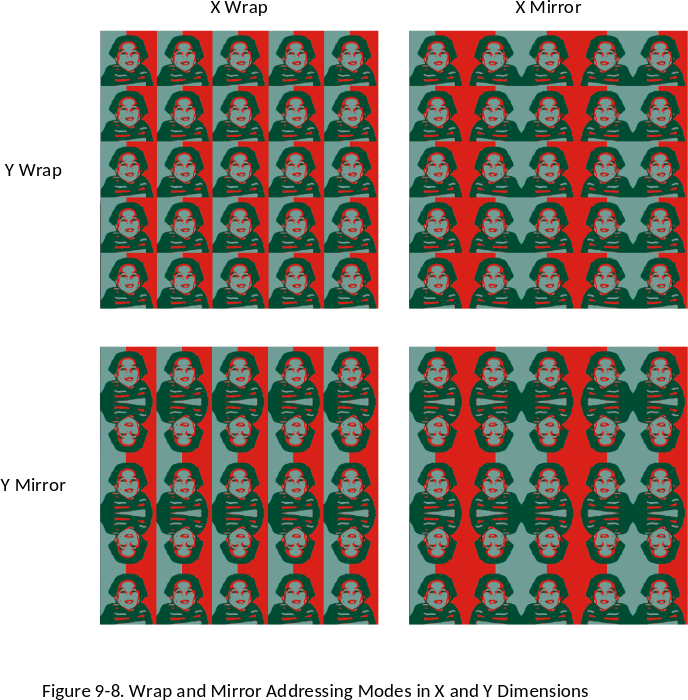
Readers are encouraged to run the program, or especially to modify and run the program, to see the effects of different texturing settings. Figure 10-8 shows the output of the program for the four permutations of X Wrap/Mirror and Y Wrap/Mirror when replicating the texture 5 times.
Figure 10-8. Wrap and Mirror Addressing Modes