Before describing the features of the fixed-function texturing hardware, let’s spend some time examining the underlying memory from which a texture object may be built.
CUDA can use texture to read from either device memory or CUDA arrays.
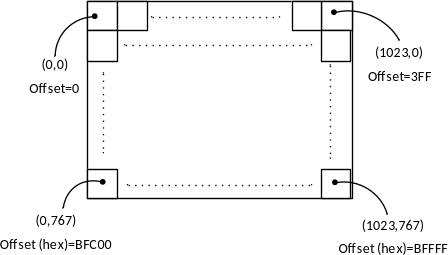
In device memory, the textures are addressed in row-major order. A 1024x768 texture might look like this:
Figure 10-1. 1024x768 image.
where Offset is the offset (in elements) from the base pointer of the image:
(Equation 10-1) \(Offset = Y*Width + X\)
For a byte offset, multiply by the size of the elements:
(Equation 10-2) \(ByteOffset = sizeof(T)*(Y*Width + X)\)
In practice, this addressing calculation only works for the most convenient of texture widths - 1024 happens to be convenient because it is a power of 2 and conforms to all manner of alignment restrictions. To accommodate less-convenient texture sizes, CUDA implements pitch-linear addressing, where the width of the texture memory is different than the width of the texture. For less-convenient widths, the hardware enforces an alignment restriction and the width in elements is treated differently from the width of the texture memory. For a texture width of 950, say, and an alignment restriction of 64 bytes, the width-in-bytes is padded to 960 (the next multiple of 64) and the texture looks like this:
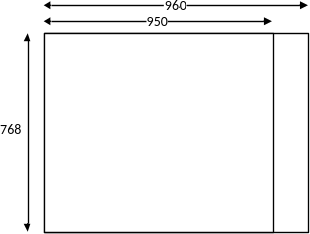
Figure 10-2. 950x768 image, with pitch.
In CUDA, the padded width in bytes is called the pitch. The total amount of device memory used by this image is 960x768 elements.
The offset into the image now is computed in bytes, as follows:
\[ByteOffset = Y*Pitch + XInBytes\]
Applications can call cudaMallocPitch()/cuMemAllocPitch() to delegate
selection of the pitch to the CUDA driver1.
In 3D, pitch-linear images of a given Depth are exactly like 2D images, with Depth 2D slices laid out contiguously in device memory.
CUDA arrays are designed specifically to support texturing. They are allocated from the same pool of physical memory as device memory, but have an opaque layout and cannot be addressed with pointers. Instead, memory locations in a CUDA array must be identified by the array handle and a set of 1D, 2D or 3D coordinates.
CUDA arrays perform a more complicated addressing calculation, designed so that contiguous addresses exhibit 2D or 3D locality. The addressing calculation is hardware-specific and changes from one hardware generation to the next. Figure 10-3 illustrates one of the mechanisms used: the 2 least significant address bits of Row and Column have been interleaved before undertaking the addressing calculation.
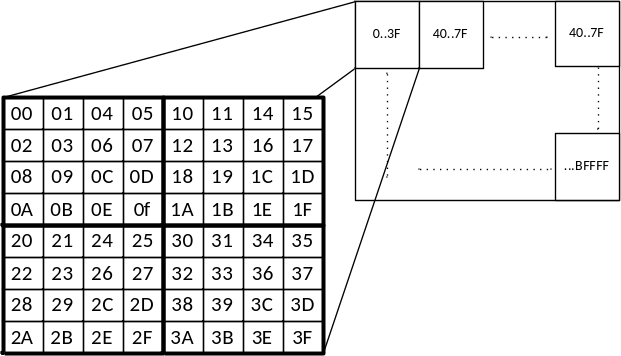
Figure 10-3. 1024x768 image, interleaved bits
As you can see in Figure 10-3, bit interleaving enables contiguous addresses to have “dimensional locality”: a cache line fill pulls in a block of pixels in a neighborhood rather than a horizontal span of pixels2. When taken to the limit, bit interleaving imposes some inconvenient requirements on the texture dimensions, so it is just one of several strategies used for the so-called “block linear” addressing calculation.
In contrast to device memory, where the location of an image element can be specified by:
The base pointer, pitch, and a (X, Y) or (X, Y, Z) tuple,
The base pointer and an offset as computed by Equation 10-1, or
The device pointer with the offset already applied.
When using CUDA arrays, because the memory locations cannot be specified by device memory addresses, locations must be specified in terms of the CUDA array and a tuple (XInBytes, Y) or (XInBytes, Y, Z).
Using the CUDA runtime, CUDA arrays may be created by calling
cudaMallocArray().
cudaError_t cudaMallocArray(struct cudaArray **array, const struct cudaChannelFormatDesc *desc, size_t width, size_t height __dv(0), unsigned int flags __dv(0));
array passes back the array handle, and
desc specifies the number and type of components (e.g., 2
floats) in each array element. width specifies the width of the array
in elements. height is an optional parameter that
specifies the height of the array; if height is not
specified, cudaMallocArray() creates a 1D CUDA array.
The flags parameter is used to hint at the CUDA array’s
usage. As of this writing, the only flag is
cudaArraySurfaceLoadStore, which hints that the CUDA array
will be used for surface read/write operations as described later in
this chapter.
The structure cudaChannelFormatDesc describes the contents of a
texture:
   struct cudaChannelFormatDesc {
     int x, y, z, w;
   enum cudaChannelFormatKind f;
   };
The x, y, z and w
members of the structure specify the number of bits in each member of
the texture element. For example, a 1-element float texture will contain
x==32 and the other elements will be 0. The
cudaChannelFormatKind structure specifies whether the data
is signed integer, unsigned integer, or floating point:
enum cudaChannelFormatKind
{
    cudaChannelFormatKindSigned = 0,
    cudaChannelFormatKindUnsigned = 1,
    cudaChannelFormatKindFloat = 2,
    cudaChannelFormatKindNone = 3
};
Developers can create cudaChannelFormatDesc structures
using the cudaCreateChannelDesc() function:
cudaChannelFormatDesc cudaCreateChannelDesc(int x, int y, int z, int w, cudaChannelFormatKind kind);
Alternatively, a templated family of functions can be invoked as follows:
template<class T> cudaCreateChannelDesc<T>();
where T may be any of the native formats supported by
CUDA. Here are two examples of the specializations of this template:
template<> __inline__ __host__ cudaChannelFormatDesc cudaCreateChannelDesc<float>(void)
{
  int e = (int)sizeof(float) * 8;
  return cudaCreateChannelDesc(e, 0, 0, 0, cudaChannelFormatKindFloat);
}
template<> __inline__ __host__ cudaChannelFormatDesc cudaCreateChannelDesc<uint2>(void)
{
  int e = (int)sizeof(unsigned int) * 8;
  return cudaCreateChannelDesc(e, e, 0, 0, cudaChannelFormatKindUnsigned);
}
CAUTION: When using the char data type, be aware that some compilers assume char is signed, while others assume it is unsigned. You can always make this distinction unambiguous with the signed keyword.
3D CUDA arrays may be allocated with cudaMalloc3DArray():
cudaError_t cudaMalloc3DArray(struct cudaArray** array, const struct cudaChannelFormatDesc* desc, struct cudaExtent extent, unsigned int flags __dv(0));
Rather than taking width, height and depth parameters,
cudaMalloc3DArray() takes a cudaExtent structure:
struct cudaExtent {
  size_t width;
  size_t height;
  size_t depth;
};
The flags parameter, like that of cudaMallocArray(), must be
cudaArraySurfaceLoadStore if the CUDA array will be used
for surface read/write operations.
For array handles, the CUDA runtime and driver API are compatible
with one another. The pointer passed back by cudaMallocArray() can be
cast to CUarray and passed to driver API functions such as
cuArrayGetDescriptor().
The driver API equivalents of cudaMallocArray() and
cudaMalloc3DArray() are cuArrayCreate() and cuArray3DCreate(),
respectively:
CUresult cuArrayCreate(CUarray *pHandle, const CUDA_ARRAY_DESCRIPTOR *pAllocateArray);
CUresult cuArray3DCreate(CUarray *pHandle, const CUDA_ARRAY3D_DESCRIPTOR *pAllocateArray);
cuArray3DCreate() can be used to allocate 1D or 2D CUDA arrays by
specifying 0 as the height or depth, respectively. The
CUDA_ARRAY3D_DESCRIPTOR structure is as follows:
typedef struct CUDA_ARRAY3D_DESCRIPTOR_st
{
    size_t Width; /** Width of 3D array */
    size_t Height; /** Height of 3D array */
    size_t Depth; /** Depth of 3D array */
    CUarray_format Format; /** Array format */
    unsigned int NumChannels; /** Channels per array element */
    unsigned int Flags; /** Flags */
} CUDA_ARRAY3D_DESCRIPTOR;
Together, the Format and NumChannels
members describe the size of each element of the CUDA array:
NumChannels may be 1, 2 or 4, and Format
specifies the channels’ type, as follows:
typedef enum CUarray_format_enum {
    CU_AD_FORMAT_UNSIGNED_INT8 = 0x01,
    CU_AD_FORMAT_UNSIGNED_INT16 = 0x02,
    CU_AD_FORMAT_UNSIGNED_INT32 = 0x03,
    CU_AD_FORMAT_SIGNED_INT8 = 0x08,
    CU_AD_FORMAT_SIGNED_INT16 = 0x09,
    CU_AD_FORMAT_SIGNED_INT32 = 0x0a,
    CU_AD_FORMAT_HALF = 0x10,
    CU_AD_FORMAT_FLOAT = 0x20
} CUarray_format;
NOTE: The format specified in
CUDA_ARRAY3D_DESCRIPTOR is not “binding” – it is just a convenient way
to specify the amount of data in the CUDA array – it is perfectly valid
to create a texture object with a single-component 32-bit int channel
format over a CUDA array containing 4-component bytes (32 bits per
element).
Sometimes, CUDA array handles are passed to subroutines that need to
query the dimensions and/or format of the input array. The
cuArray3DGetDescriptor() function is provided for that purpose:
CUresult cuArray3DGetDescriptor(CUDA_ARRAY3D_DESCRIPTOR *pArrayDescriptor, CUarray hArray);
Note that this function may be called on 1D and 2D CUDA arrays, even
ones that were created with cuArrayCreate().
For applications that exhibit sparse access patterns, especially patterns with dimensional locality (for example, computer vision applications), CUDA arrays are a clear win. For applications with regular access patterns, especially ones with little to no reuse or whose reuse can be explicitly managed by the application in shared memory, device pointers are the obvious choice.
Some applications, such as image processing applications, fall into a gray area where the choice between device pointers and CUDA arrays is not obvious. All other things being equal, device memory is probably preferable to CUDA arrays; but the following considerations may be used to help in the decision-making process.
Originally, CUDA kernels could not write to CUDA arrays - they were only able to read from them via texture intrinsics. Surface read/write intrinsics added the ability for Fermi-class hardware to access 2D CUDA arrays.
CUDA arrays do not consume any CUDA address space.
On WDDM drivers (Windows Vista and later), the system can automatically manage the residence of CUDA arrays: they can be swapped into and out of device memory transparently, depending on whether they are needed by the CUDA kernels that are executing. In contrast, WDDM requires all device memory to be resident in order for any kernel to execute.
CUDA arrays can reside only in device memory, and the GPU can convert between the two representations while transferring the data across the bus. For some applications, keeping a pitch representation in host memory and a CUDA array representation in device memory is the best fit.