Our first implementation of normalized cross-correlation will use the texture unit to read both image and template values. This implementation is not optimized – it does not even include the optimization to precompute the template statistics – but it is simple to understand and will serve as a good basis for more highly optimized (but more byzantine) implementations.
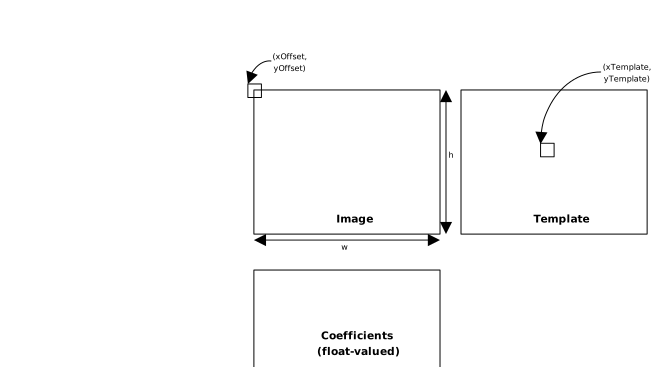
Figure 15-1 shows a correlation search window, in which a template is
compared to each set of corresponding pixels in the input image. The
upper left corner of the image is given by (xUL, yUL); the
width and height of the search window, and hence the output array of
coefficients, is given by w and h. If the
template is in a texture (as shown in Figure 15-1), the upper left
corner of the template in the texture image is given by
(xTemplate, yTemplate).
Figure 15-1. Correlation Search
Finally, an offset (xOffset, yOffset) specifies how the
template will be overlaid with the image for comparison purposes. When
fetching image pixels, this offset is added to the coordinates of the
search rectangle whose upper left corner is (xUL, yUL).
It’s instructive to look at how the correlation function “falls off”
in the neighborhood of the image from which a template is extracted. The
sample program normalizedCrossCorrelation.cu writes out the
neighborhood around the template:
Neighborhood around template:
  0.71 0.75 0.79 0.81 0.82 0.81 0.81 0.80 0.78
  0.72 0.77 0.81 0.84 0.84 0.84 0.83 0.81 0.79
  0.74 0.79 0.84 0.88 0.88 0.87 0.85 0.82 0.79
  0.75 0.80 0.86 0.93 0.95 0.91 0.86 0.83 0.80
  0.75 0.80 0.87 0.95 1.00 0.95 0.88 0.83 0.81
  0.75 0.80 0.86 0.91 0.95 0.93 0.87 0.82 0.80
  0.75 0.80 0.84 0.87 0.89 0.88 0.85 0.81 0.78
  0.73 0.78 0.81 0.83 0.85 0.85 0.82 0.79 0.76
  0.71 0.75 0.78 0.81 0.82 0.82 0.80 0.77 0.75
In the coins image included in the book, the default template is a 52x52 subimage around the dime in the lower right corner (Figure 15-2).
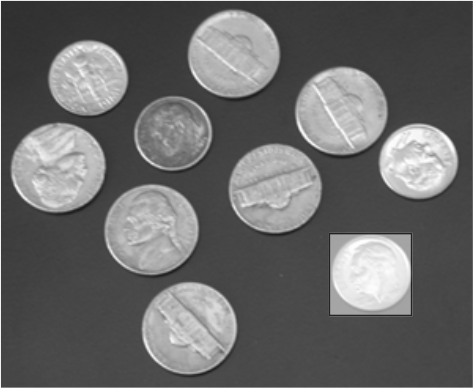
Figure 15-2. coins.pgm (with default template
highlighted)
The default program optionally can write a PGM file as output, with the correlation values converted to pixel values in the range 0..255. For the template highlighted in Figure 15-2, the resulting image is given in Figure 15-3: the other dimes are very bright, with strong matches, while the other coins get less-intense responses.
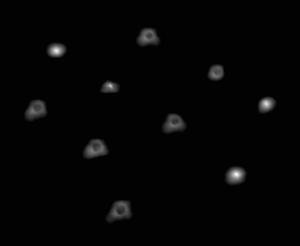
Figure 15-3. Correlation image with default template.
Listing 15-1 gives the kernel that performs this computation. It
computes the five sums, then uses the CorrelationValue() utility
function given earlier to write the float-valued correlation
coefficients into the output array.
__global__ void corrTexTex2D_kernel( float *pCorr, size_t CorrPitch, float cPixels, int xOffset, int yOffset, int xTemplate, int yTemplate, int wTemplate, int hTemplate, float xUL, float yUL, int w, int h ){ size_t row = blockIdx.y*blockDim.y + threadIdx.y; size_t col = blockIdx.x*blockDim.x + threadIdx.x; // adjust pCorr to point to row pCorr = (float *) ((char *) pCorr+row*CorrPitch); // No __syncthreads in this kernel, so we can early-out // without worrying about the effects of divergence. if ( col >= w || row >= h ) return; int SumI = 0; int SumT = 0; int SumISq = 0; int SumTSq = 0; int SumIT = 0; for ( int y = 0; y < hTemplate; y++ ) { for ( int x = 0; x < wTemplate; x++ ) { unsigned char I = tex2D( texImage, (float) col+xUL+xOffset+x, (float) row+yUL+yOffset+y ); unsigned char T = tex2D( texTemplate, (float) xTemplate+x, (float) yTemplate+y); SumI += I; SumT += T; SumISq += I*I; SumTSq += T*T; SumIT += I*T; } float fDenomExp = (float) ( (double) cPixels*SumTSq - (double) SumT*SumT); pCorr[col] = CorrelationValue( SumI, SumISq, SumIT, SumT, cPixels, fDenomExp ); }}corrTexTex_kernel() (source on GitHub)Listing 15-2 gives the host code to invoke corrTexTex_kernel(). It is
designed to work with the testing and performance code in the sample
source file normalizedCrossCorrelation.cu, which is why it has so many
parameters. This host function just turns around and launches the kernel
with the needed parameters, but later implementations of this function
will check the device properties and launch different kernels depending
on what it finds. For images of a useful size, the cost of doing such
checks is miniscule as compared to the kernel runtime.
voidcorrTexTex2D( float *dCorr, int CorrPitch, int wTile, int wTemplate, int hTemplate, float cPixels, float fDenomExp, int sharedPitch, int xOffset, int yOffset, int xTemplate, int yTemplate, int xUL, int yUL, int w, int h, dim3 threads, dim3 blocks, int sharedMem ){ corrTexTex2D_kernel<<<blocks, threads>>>( dCorr, CorrPitch, cPixels, xOffset, yOffset, xTemplate+xOffset, yTemplate+yOffset, wTemplate, hTemplate, (float) xUL, (float) yUL, w, h );}corrTexTex() (host code) (source on GitHub)A texture-texture formulation is a very good fit, if the application is choosing different templates as well as different images during its search –for example, applying transformations to the template data while comparing to the image. But for most applications, the template is chosen once and compared against many different offsets within the image. The remainder of the chapter will examine implementations that are optimized for that case.