Like kernel launches, asynchronous memcpy calls return before the GPU has performed the memcpy in question. Because the GPU operates autonomously and can read or write the host memory without any operating system involvement, only pinned memory is eligible for asynchronous memcpy.
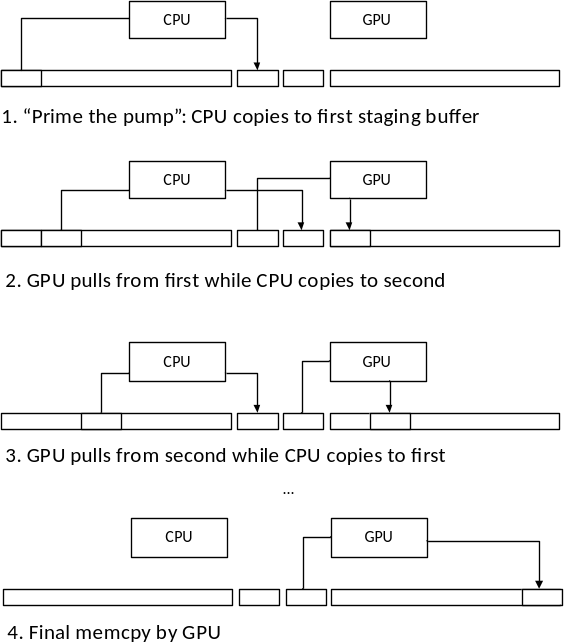
The earliest application for asynchronous memcpy in CUDA was hidden inside the CUDA driver: the GPU cannot access pageable memory directly, so the driver implements pageable memcpy using a pair of pinned “staging buffers” that are allocated with the CUDA context. Figure 6-3 shows how this process works.
Figure 6-3. Pageable Memcpy
To perform a host→device memcpy, the driver first “primes the pump” by copying to one staging buffer, then kicks off a DMA operation to read that data with the GPU. While the GPU begins processing that request, the driver copies more data into the other staging buffer. The CPU and GPU keep ping-ponging between staging buffers, with appropriate synchronization, until it is time for the GPU to perform the final memcpy. Besides copying data, the CPU also naturally pages in any nonresident pages while the data is being copied.
As with kernel launches, asynchronous memcpy’s incur fixed CPU overhead in the driver. In the case of host→device memcpy, all memcpy’s below a certain size are asynchronous, because the driver copies the source data directly into the command buffer that it uses to control the hardware.
We can write an application that measures asynchronous memcpy overhead, much as we measured kernel launch overhead earlier:
    cuda(Malloc( &deviceInt, sizeof(int) ) );
    cuda(HostAlloc( &hostInt, sizeof(int), 0 ) );
    start = std::chrono::steady_clock::now();
    for ( int i = 0; i < cIterations; i++ ) {
        cuda(MemcpyAsync( deviceInt, hostInt, sizeof(int),
            cudaMemcpyHostToDevice, NULL ) );
    }
    cuda(DeviceSynchronize() );
    stop = std::chrono::steady_clock::now();
This code, in a program called nullHtoDMemcpyAsync.cu, reports that
on a g2.2xlarge instance in Amazon EC2, each memcpy takes 3.3 μs (about
1.5 μs on a GeForce RTX 3060). Since PCI Express can transfer several
kilobytes in that time, it makes sense to examine how the time needed to
perform a small memcpy grows with the size.
The breakevenHtoDMemcpy.cu program measures memcpy performance for
sizes from 4K to 64K. On a cg1.4xlarge instance in Amazon EC2, it
generates the data plotted in Figure 6-4, shown alongside the same sweep
on a GeForce RTX 3060.
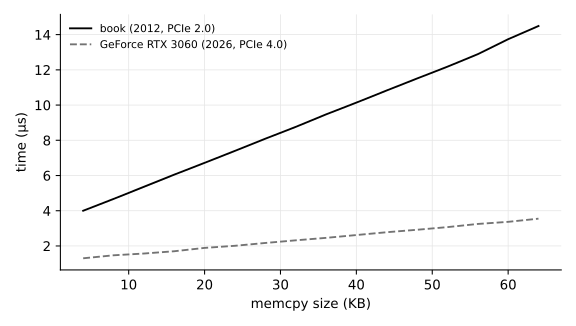
Figure 6-4. Small Host→Device Memcpy Performance
The data generated by this program is clean enough to fit to a linear regression curve: in this case, with intercept 3.3 μs and slope 0.000170μs/byte. The slope corresponds to 5.9GB/s, about the expected bandwidth from PCI Express 2.0. On the RTX 3060, the same fit gives a lower intercept (about 1.3 μs) and a slope near 0.0000366μs/byte – some 27GB/s, in line with PCI Express 4.0.
The nullDtoHMemcpyAsync.cu and breakevenDtoHMemcpy.cu programs
perform the same measurements for small device→host memcpy’s. On our
trusty Amazon EC2 instance, the minimum time for a memcpy is 4.00 μs
(about 1.1 μs on the RTX 3060); Figure 6-5 plots both device→host
curves.
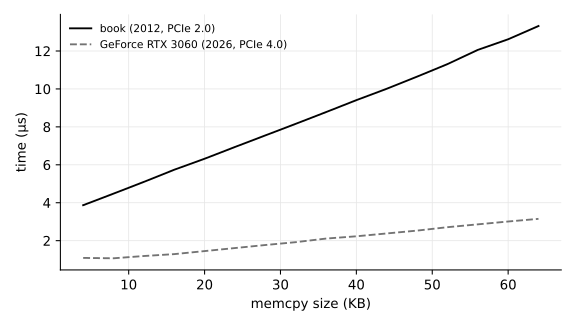
Figure 6-5. Small Device→Host Memcpy Performance
Any streamed operation may be called with NULL as the stream
parameter, and the operation will not be initiated until all preceding
operations on the GPU have been completed3.
Applications use the NULL stream to facilitate CPU/GPU concurrency when
there is no need to use copy engines to perform memcpy operations
concurrently with kernel processing.
Once a streamed operation has been initiated with the NULL stream,
the application must use synchronization functions such as
cuCtxSynchronize() or cudaDeviceSynchronize() to ensure that the GPU has
completed the operation. But the application may request many such
operations before performing the synchronization. For example, the
application may perform an asynchronous host→device memcpy, one or more
kernel launches, and an asynchronous device→host memcpy before
synchronizing with the context. The cuCtxSynchronize() or
cudaDeviceSynchronize() call returns once the GPU has performed the
last-requested operation. This idiom is especially useful when
performing smaller memcpy’s, or launching kernels that will not run for
long; the CUDA driver takes valuable CPU time to write commands to the
GPU, and overlapping that CPU execution with the GPU’s processing of the
commands can improve performance.
Note: kernel launches have always been asynchronous. As a result, the NULL stream is implicitly specified to all kernel launches if no stream is given.
Whenever an application performs a full CPU/GPU synchronization
(having the CPU wait until the GPU is completely idle), performance
suffers. We can measure this performance impact by switching our
NULL-memcpy calls from asynchronous ones to synchronous ones, just by
changing the cudaMemcpyAsync() calls to cudaMemcpy() calls. The
nullDtoHMemcpySync.cu program does just that, for device→host
memcpy.
On our trusty Amazon g2.2xlarge instance, nullDtoHMemcpySync.cu
reports about 7.9 μs per memcpy (about 3.6 μs on the RTX 3060). If a
Windows driver has to perform a kernel thunk, or the driver on an
ECC-enabled GPU must check for ECC errors, full GPU synchronization is
much costlier.
Explicit ways to perform this synchronization include the following:
cuCtxSynchronize()/cudaDeviceSynchronize(),
cuStreamSynchronize()/cudaStreamSynchronize() on the NULL
stream,
Unstreamed memcpy between host and device, e.g. cuMemcpyHtoD(),
cuMemcpyDtoH(), cudaMemcpy().
Other, more subtle ways to break CPU/GPU concurrency include:
Running with the CUDA_LAUNCH_BLOCKING environment variable
set,
Launching kernels that require local memory to be reallocated,
Performing large memory allocations or host memory allocations,
Destroying objects such as CUDA streams and CUDA events.
To create a stream that is exempt from the requirement to synchronize
with the NULL stream (and hence less likely to suffer a “concurrency
break” as described above), specify the CUDA_STREAM_NON_BLOCKING flag to
cuStreamCreate() or the cudaStreamNonBlocking flag to
cudaStreamCreateWithFlags().
A stream may also be created with a priority, which biases
the order in which the GPU’s block scheduler dispatches ready work when
blocks from several streams compete for the same multiprocessors.
cudaStreamCreateWithPriority() takes an integer priority whose valid
range is reported by cudaDeviceGetStreamPriorityRange(); following the
convention of the Unix nice value, lower numbers are higher
priority, and the range is typically small (on many GPUs, just 0 and
-1). Priority steers only which ready blocks are launched first – it
does not preempt a block already running, nor reserve any part of the
GPU – so its use is to let a short, latency-sensitive kernel slip ahead
of a long throughput kernel that would otherwise hold the
multiprocessors until it finished. The green contexts of Section 7.7
serve the same goal the other way, partitioning the multiprocessors in
space rather than ordering the work in time.
When CUDA streams were introduced, the designers had a choice between making the NULL stream “its own” stream, separate from other streams and serialized only with itself; or to make the NULL stream synchronize with (“join”) all engines on the GPU. They opted for the latter, in part because CUDA did not yet have facilities for inter-stream synchronization.↩︎