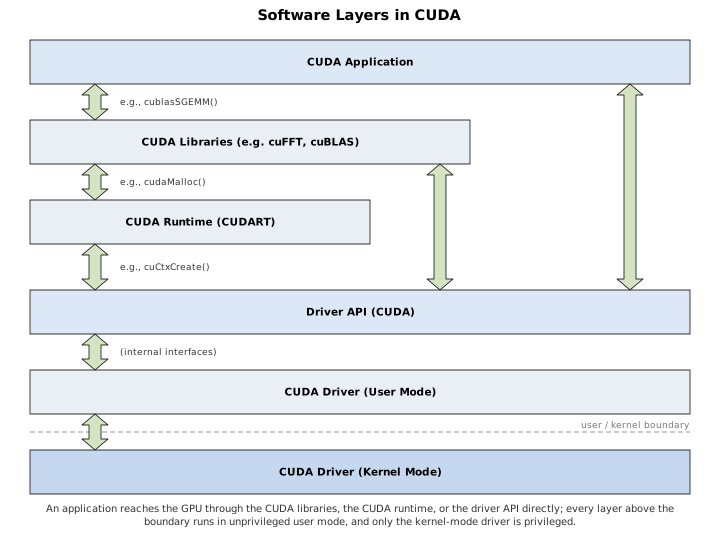
Figure 3-1 shows the different layers of software present in a CUDA application, from the application itself to the CUDA driver that operates the GPU hardware. All of the software except the kernel mode driver operates in the target operating system’s unprivileged user mode. Under the security models of modern multitasking operating systems, user mode is “untrusted,” and the hardware and operating system software must take measures to strictly partition applications from one another. In the case of CUDA, that means host and device memory allocated by one CUDA program cannot be accessed by other CUDA programs. The only exceptions happen when these programs specifically request memory sharing, which must be provided by the kernel mode driver.
CUDA libraries, such as cuBLAS, are built on top of the CUDA runtime or driver API.
The CUDA runtime is the library targeted by CUDA’s integrated C++/GPU
toolchain. When the nvcc compiler splits .cu
files into host and device portions, the host portion contains
automatically-generated calls to the CUDA runtime to facilitate
operations such as the kernel launches invoked by nvcc’s
special triple-angle bracket <<< >>> syntax.
The CUDA driver API, exported directly by CUDA’s user mode driver, is the lowest-level API available to CUDA apps. The driver API calls into the user mode driver, which may in turn call the kernel mode driver to perform operations such as memory allocation.
Functions in the driver API and CUDA runtime generally start with
cu*() and cuda*(), respectively. Many functions (such as
cudaEventElapsedTime()) are essentially identical, with the only
difference being in the prefix.
Figure 3-1. Software Layers in CUDA
The CUDA runtime (often abbreviated CUDART) is the library used by
the language integration features of CUDA. Each version of the CUDA
toolchain has its own version of the CUDA runtime, and programs built
with that toolchain are linked against the matching version. By default,
nvcc links the runtime statically (the
cudart_static library), so it is built into the executable;
linking it dynamically instead (the cudart shared library)
requires that a compatible runtime be present on the system at
runtime.
The CUDA driver is designed to be backward compatible, supporting all
programs written against its version of CUDA, or older ones. It exports
a low-level “driver API” (in cuda.h) that enables
developers to closely manage resources and the timing of
initialization.
The version of CUDA supported by the driver, and the version the runtime was built against, can be queried at runtime:
CUresult    cuDriverGetVersion( int *driverVersion );
cudaError_t cudaRuntimeGetVersion( int *runtimeVersion );
Each passes back a decimal value encoded as 1000 × major + 10 × minor – 3010 for CUDA 3.1, 5000 for CUDA 5.0, 12040 for CUDA 12.4. Table 3-1 lists the features introduced by the major CUDA releases.
| CUDA version | Features introduced |
|---|---|
| 1.0 | CUDA |
| 1.1 | Streams and events; concurrent 1D memcpy and kernel execution |
| 2.0 | 3D texturing |
| 2.1 | Improved OpenGL interoperability |
| 2.2 | Portable, mapped and write-combined pinned memory; texturing from pitch memory |
| 3.0 | Fermi; multiple copy engines; concurrent kernel execution |
| 3.1 | GPUDirect |
| 3.2 | 64-bit addressing; malloc()/free() in CUDA
kernels |
| 4.0 | Unified virtual addressing; improved threading support; host memory registration; GPUDirect 2.0 (peer-to-peer memcpy and mapping); layered textures |
| 4.1 | Cubemap textures; inter-process peer-to-peer mappings |
| 4.2 | Kepler |
| 5.0 | Dynamic parallelism; GPUDirect RDMA |
| 5.5 | Multi-Process Service (MPS) |
| 6.0 | Maxwell; unified (managed) memory |
| 7.0 | C++11 in device code; runtime compilation (NVRTC) |
| 7.5 | Half-precision (FP16) arithmetic |
| 8.0 | Pascal; demand-paged unified memory with oversubscription; NVLink |
| 9.0 | Volta; Tensor Cores; cooperative groups; independent thread
scheduling and the *_sync warp intrinsics |
| 10.0 | Turing; CUDA graphs |
| 11.0 | Ampere; asynchronous copy (memcpy_async); minor-version
compatibility; Multi-Instance GPU (MIG) |
| 11.2 | Stream-ordered memory allocation (cudaMallocAsync) |
| 12.0 | Hopper; thread block clusters and distributed shared memory; lazy module loading |
| 12.8 | Blackwell |
Table 3-1. CUDA Driver Features
Historically, the rule relating the two versions was strict: the
installed driver had to be at least as new as the runtime the
application was built against, or the application would fail to
initialize with the error cudaErrorInsufficientDriver (35).
CUDA 11 relaxed this within a major release through minor-version
compatibility. An application built with, say, CUDA 12.4 runs on
any driver from the 12.x series – any driver at least as new as CUDA
12.0’s – rather than requiring one from 12.4 or later; only crossing a
major version still demands a matching or newer driver. Where even that
is impractical, as on data center systems whose drivers are deliberately
held back, a forward compatibility package installed alongside
the older driver lets a newer CUDA toolkit run on it.
The device runtime is a subset of the CUDA runtime that can be invoked from CUDA kernels. A detailed description of the device runtime is given in Chapter 7.
Other than Windows Vista and subsequent releases of Windows, all of the operating systems that CUDA runs on – Linux, MacOS, and Windows XP – access the hardware with user mode client drivers. User mode client drivers sidestep the requirement, common to all modern operating systems, that hardware resources be manipulated by kernel code. Modern hardware such as GPUs can finesse that requirement by mapping certain hardware registers – such as the doorbell register used to submit work to the hardware – into user mode. Since user mode code is not trusted by the operating system, the hardware must contain protections against rogue writes to the user mode hardware registers. The goal is to prevent user mode code from prompting the hardware to use its direct memory access (DMA) facilities to read or write memory that it should not (such as the operating system’s kernel code!). Hardware designers protect against memory corruption by introducing a level of indirection into the command stream available to user mode software, so DMA operations can only be initiated on memory that previously was validated and mapped by kernel code; in turn, driver developers must carefully validate their kernel code to ensure that it only gives access to memory that should be made available.
The end result is a driver that can operate at peak efficiency by submitting work to the hardware without having to incur the expense of a kernel transition.
Many operations, such as memory allocation, still require kernel mode transitions, because editing the GPU’s page tables can only be done in kernel mode. In this case, the user mode driver may take steps to reduce the number of kernel mode transitions; for example, the CUDA memory allocator tries to satisfy memory allocation requests out of a pool.
Unified virtual addressing, described in detail in Section 2.4.5, is available on 64-bit Linux, 64-bit XPDDM, and MacOS. On these platforms, it is made available transparently. As of this writing, UVA is not available on WDDM.
For Windows Vista, Microsoft introduced a new desktop presentation model in which the screen output was composed in a back buffer and page-flipped, like a video game. The new “Windows Desktop Manager” (WDM) made more extensive use of GPUs than Windows had previously, so Microsoft decided it would be best to revise the GPU driver model in conjunction with the presentation model. The resulting Windows Display Driver Model (WDDM) is now the default driver model on Windows Vista and subsequent versions. The term XPDDM was created to refer to the driver model used for GPUs on previous versions of Windows1.
As far as CUDA is concerned, the two major changes made by WDDM are as follows:
WDDM does not permit hardware registers, such as the “doorbell” register to notify the GPU that new work is available, to be mapped into user mode. Hardware commands – even commands to kick off DMA operations – must be invoked by kernel code. The user→kernel transition is too expensive for the user mode driver to submit each command as it arrives, so instead the user mode driver buffers commands for later submission.
Since WDDM was built to enable many applications to use a GPU concurrently, and the GPUs of the day did not support demand paging, WDDM includes facilities to emulate paging on a “memory object” basis. For graphics applications, memory objects may be render targets, Z buffers or textures; for CUDA, memory objects include global memory and CUDA arrays. Since the driver must set up access to CUDA arrays before each kernel invocation, CUDA arrays can be swapped by WDDM; but for global memory, which resides in a linear address space (where pointers can be stored), every memory object for a given CUDA context must be resident in order for a CUDA kernel to launch.
The main effect of WDDM due to 1) is that work requested of CUDA, such as kernel launches or asynchronous memcpy operations, generally is not submitted to the hardware immediately.
The accepted idiom to force pending work to be submitted is to query
the NULL stream: cudaStreamQuery(0) or
cuStreamQuery(NULL). If there is no pending work, these
calls will return quickly; but if any work is pending, it will be
submitted and, since the call is asynchronous, execution may be returned
to the caller before the hardware has finished processing. On non-WDDM
platforms, querying the NULL stream is always fast.
The main effect of WDDM due to 2) is that CUDA’s control of memory allocation is much less concrete. On user mode client drivers, successful memory allocations mean that the memory has been allocated and is no longer available to any other operating system client (such as a game or other CUDA application that may be running). On WDDM, if there are applications competing for time on the same GPU, Windows can and will swap memory objects out in order to enable each application to run. Windows tries to make this as efficient as possible, but as with all paging, having it never happen is much faster than having it ever happen.
Because Windows uses the GPU to interact with users, it is important that compute applications not take inordinate amounts of GPU time. Under WDDM, Windows enforces a timeout (default of 2 seconds) that, if it should elapse, will cause a dialog box that says “Display driver stopped responding and has recovered,” and the display driver is restarted. If this happens, all work in the CUDA context is lost.
Read more about TDR (Timeout Detection and Recovery)
For compute applications that do not need WDDM, NVIDIA provides the
Tesla Compute Cluster (TCC) driver, available only for Tesla-class
boards. The TCC driver is a user mode client driver, so does not require
a kernel thunk to submit work to the hardware. The TCC driver may be
enabled and disabled using the nvidia-smi tool.
nvcc is the compiler driver used by CUDA developers to
turn source code into functional CUDA applications. It can perform many
functions, as complex as compiling, linking and executing a sample
program in one command (a usage encouraged by many of the sample
programs in this book) to a simple targeted compilation of a GPU-only
.cu file.
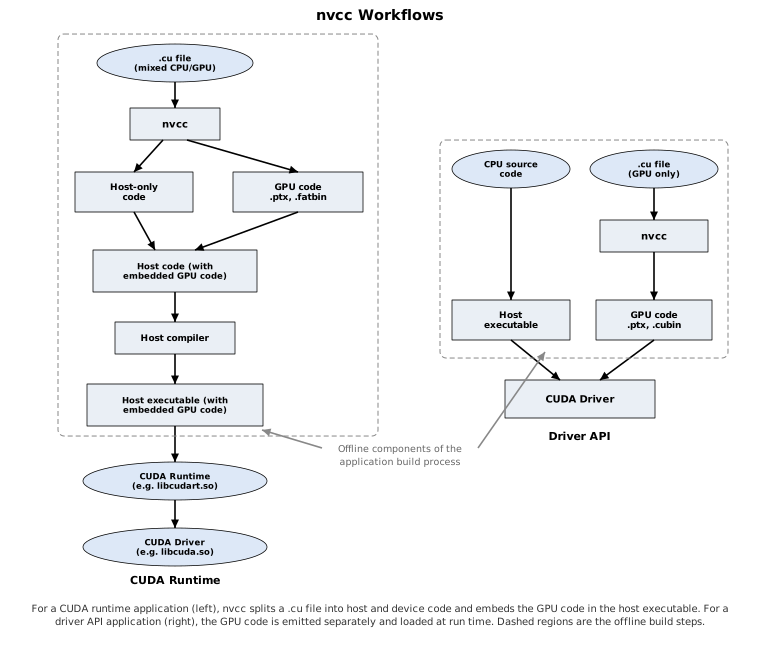
Figure 3-2. nvcc workflows
Figure 3-2 shows the two recommended workflows for using
nvcc, for CUDA runtime and driver API applications,
respectively. For applications larger than the most trivial size,
nvcc is best used strictly for purposes of compiling CUDA
code, and wrapping CUDA functionality into code that is callable from
other tools. The reason is because nvcc has a number of
limitations:
nvcc only works with a specific set of compilers.
Many CUDA developers never notice because their compiler of choice
happens to be in the set of supported compilers. But in production
software development, the amount of CUDA code tends to be minuscule
compared to the amount of other code, and the presence or absence of
CUDA support may not be the dominant factor in deciding which compiler
to use.
nvcc makes changes to the compile environment that
may not be compatible with the build environment for the bulk of the
application.
nvcc “pollutes” the namespace with nonstandard
built-in types (e.g., int2) and intrinsic names (e.g.,
__popc()). Only in recent versions of CUDA have the intrinsics symbols
become optional, able to be used by including the appropriate
sm_*_intrinsics.h header.
For CUDA runtime applications, nvcc embeds GPU code into
string literals in the output executable. If the --fatbin
option is specified, the executable will automatically load suitable
microcode for the target GPU or, if no microcode is available, have the
driver automatically compile the PTX into microcode.
PTX (“Parallel Thread eXecution”) is the intermediate representation of compiled GPU code that can be compiled into native GPU microcode. It is the mechanism that enables CUDA applications to be “future-proof” against instruction set innovations by NVIDIA – as long as the PTX for a given CUDA kernel is available, the CUDA driver can translate it into microcode for whichever GPU the application happens to be running on (even if the GPU was not available when the code was written).
PTX can be compiled into GPU microcode both “offline” and “online.” Offline compilation refers to building software that will be executed by some computer in the future – Figure 3-2 highlights the offline portions of the CUDA compilation process. Online compilation, otherwise known as “just-in-time” compilation, refers to compiling intermediate code (such as PTX) for the computer running the application, for immediate execution.
nvcc can compile PTX offline by invoking the PTX
assembler ptxas, which compiles PTX into the native
microcode for a specific version of GPU. The resulting microcode is
emitted into a CUDA binary called a “cubin”, pronounced like “Cuban”.
Cubin files can be disassembled with cuobjdump
--dump-sass – this will dump the SASS mnemonics for the
GPU-specific microcode2.
PTX also can be compiled online (JITted) by the CUDA driver. Online
compilation happens automatically when running CUDART applications that
were built with the --fatbin option (which is the default);
.cubin and PTX representations of every kernel are included
in the executable, and if it is run on hardware that doesn’t support any
of the .cubin representations, the driver compiles the PTX
version. The driver caches these compiled kernels on disk, since
compiling PTX can be time consuming.
Finally, PTX can be generated at runtime and compiled explicitly by
the driver, by calling cuModuleLoadEx().
The driver API does not automate any of the embedding or loading of
GPU microcode. Both .cubin and .ptx files can
be given to cuModuleLoadEx(); if a .cubin is not suitable
for the target GPU architecture, an error will be returned.
A reasonable strategy for driver API developers is to compile and
embed PTX, and always JIT-compile it onto the GPU with cuModuleLoadEx(),
relying on the driver to cache the compiled microcode.